
dialysis
Fluid Watch: Keeping Dialysis Safe, One Sip at a Time
A simple app for family caregivers tracking fluid intake for dialysis patients, so every sneaky cup of tea gets counted before the next session.
Artem
Founder
· 4 min read
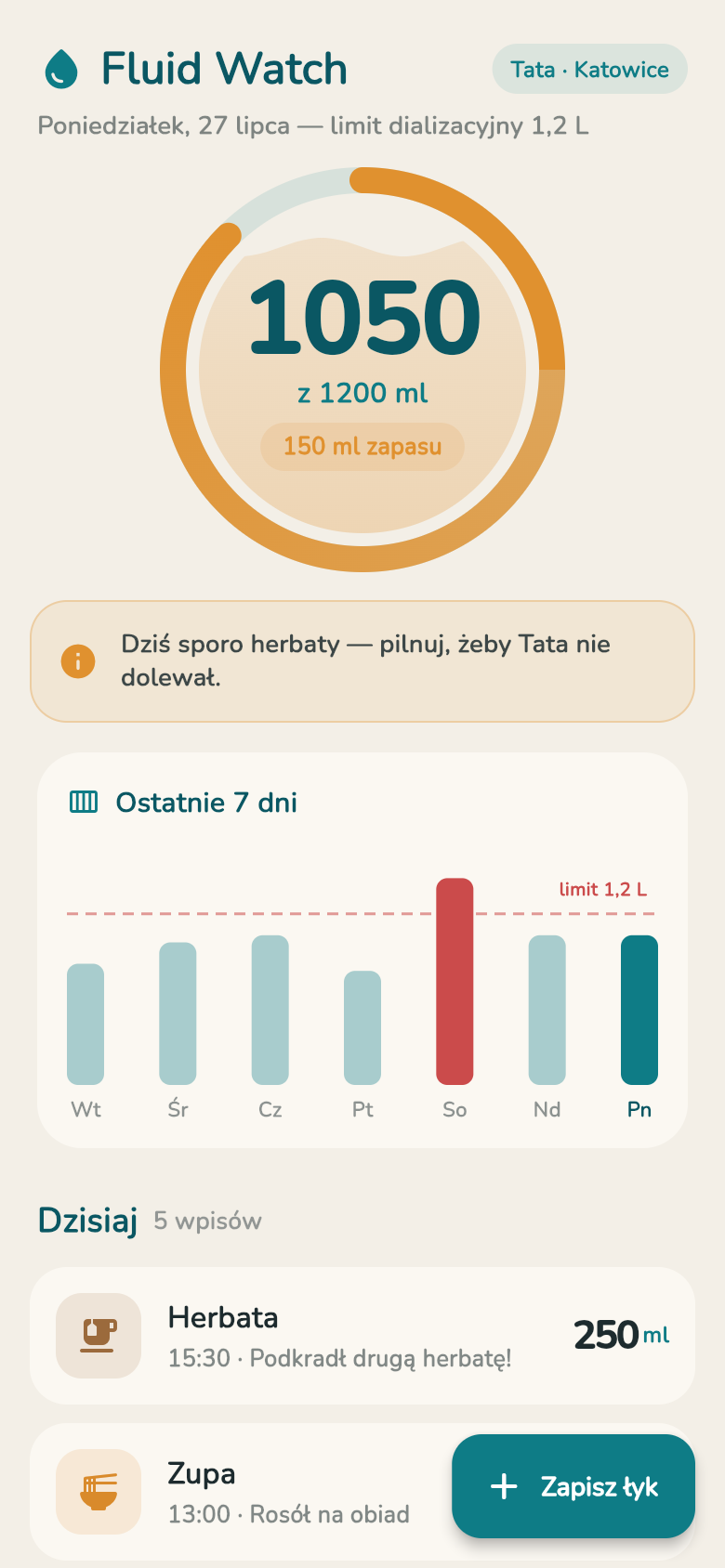
If you care for someone on dialysis, you already know the rule: every millilitre counts. A clinic sets a daily fluid ceiling, commonly around 1.2 litres, and crossing it means the next session has to pull off the extra, fast, which is hard on the body. The problem is that fluids sneak in, a cup of tea here, a bowl of soup there, a glass of kompot before bed, and by evening no one is sure how much has actually gone in.
Fluid Watch was built for exactly this situation. It gives a caregiver one clear screen showing how much fluid is left for the day, lets them log each drink in a couple of taps, and quietly keeps a history so patterns of over-limit days become visible before they become a problem at the clinic.
Live demo
The problem with paper and memory
Most caregivers start out tracking fluid on paper or in their heads. It works until it doesn't. A morning shift nurse logs breakfast, an afternoon visit adds tea, and by dinner nobody is sure whether the total is 800 ml or 1100 ml. Small drinks are the hardest part: a few sips of broth, half a glass of juice, the habitual cup of tea that a patient will quietly pour themselves when no one is watching.
Existing hydration apps make the problem worse rather than better. They are designed to encourage you to drink more, with congratulations for hitting daily goals. For someone on a dialysis fluid restriction, that framing is backwards. What the caregiver needs is a simple countdown: here is what is left, here is what is already in, stop when the colour turns red.
What you see when you open the app
The main screen shows one number above everything else: fluid remaining. A colour-coded arc moves from green through yellow to red as the day's total climbs toward 1.2 litres. You can read the situation at a glance without doing any mental arithmetic. Below the arc, the day's logged drinks are listed in order, each with a type label and a millilitre count.
Try logging a drink now using the live demo above. Tap the add button, pick a type, water, tea, soup, juice, and adjust the portion. The app suggests sensible defaults so a standard cup of tea is two taps, not a form to fill in. The remaining counter drops immediately, and if you are close to the limit, the colour shifts to let you know.
That immediacy matters. The moment a caregiver logs the afternoon tea, everyone in the household who checks the phone sees an updated total. The guesswork is gone.
History before the next session
Single-day tracking is useful. Multi-day tracking is what actually helps at the clinic. Fluid Watch stores recent days so you can scroll back and see whether Tuesday was over limit, whether Sundays tend to run high, whether the pattern changed when a new medication started.
That history is private and stored entirely on the device, no account, no cloud sync. It is there when you open the app and it does not disappear if you lose your connection, which matters when the household Wi-Fi goes down on a Saturday evening and the patient has just asked for soup.
Built for the actual caregiver, not the ideal one
The design started from a specific person: a daughter-in-law in Katowice logging fluids for her father-in-law, who will drink tea whenever she turns her back. She does not want a medical dashboard. She wants to open her phone, log the tea, see a green or yellow screen, and put the phone away.
That scenario shaped every decision in the app. The add flow is short. The default portions match real cups and bowls, not abstract millilitre targets. The warning is visual and immediate, not buried in a notification that arrives ten minutes later. And because the older patient is not expected to log anything himself, there is no shared account to set up or password to remember.
If the limit for your patient is different from 1.2 litres, the ceiling can be adjusted to match whatever the clinic prescribed. The warning colours and the remaining counter update automatically.
A tool made from a real worry
Fluid Watch did not come from a product roadmap. It came from a caregiver who needed something that did not exist: a fluid tracker that counts down instead of up, works offline, and takes two taps per drink. The whole thing was built quickly from that single idea.
If you care for someone with a fluid restriction, give the live demo above a try. Log a few drinks, watch the remaining count move, and check the history view. It is the same app, running live in your browser right now.
39
files in the build
40.7 MB
app bundle
Flutter Web
runs in any browser
Have your own caregiving problem to solve?
Fluid Watch started as a one-line idea. If you have a daily task that is annoying enough to track but too specific for any existing app, you can build your own tool the same way, describe the problem and get a working app in minutes.